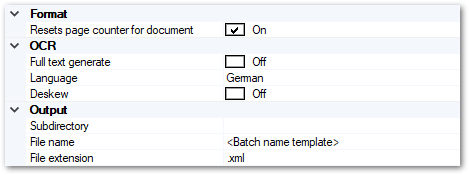
Format
Resets page counter for document
If set to On, page counters will be reset at each new document boundary.
OCR
Full text generate
If set to On, OCR will be performed across all image areas and recognition results will be saved as part of the XML data.
Language
Select the primary document language, for correct recognition of diacritics.
Deskew
Straighten the image for better text recognition results.
Output
Subdirectory
Exporting into a file system may be performed using a dynamic directory structure, which can be constructed from a multitude of strings and variables.
Filename
Filenames may be dynamically composed from a multitude of strings and variables. You will find further information in the section on Single- and Multipage Export, in the appendix.
File extension
You may change the default file extension to your liking. Please note, however, that this may interfere with other applications and your operating system.
See Also