Contents
General settings (program)Process manager
OCR (program settings)
Update function
To access and change any of the Common settings, please first choose Settings from the main menu, then click Program settings. A new window will appear.
In the left column of the window, make sure that Common is selected. You will now find all Common settings on the right side of the window, organized into sections. These will be discussed in detail, further below ...
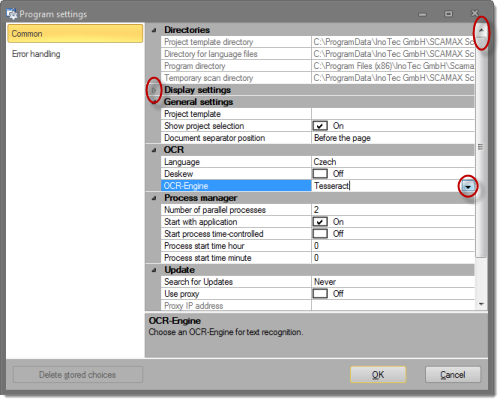
How to navigate the Common settings menu:
-
Each of the sections (Directories, Display settings, OCR etc.) may be collapsed and re-opened by clicking the symbol in front of the section name.
-
The entire list may be moved up and down by using the scrollbar on the right side of the window.
-
All sections are organized into two columns: The left column lists the parameters available for that section, the column on the right side shows their current value (text, numbers, variables). In many instances, you will be able to change these values simply by clicking them (which switches them to edit mode) and entering a new value.
-
Whenever a direct entry of values is not allowed, a click on the righthand column will either open up a drop-down menu with values to choose from (as is the case for OCR-Engine, in section OCR, in the screenshot above) or the button for an extended menu will be shown, like so:
 .
.