Defines the storage location and the folder structure used for file output.
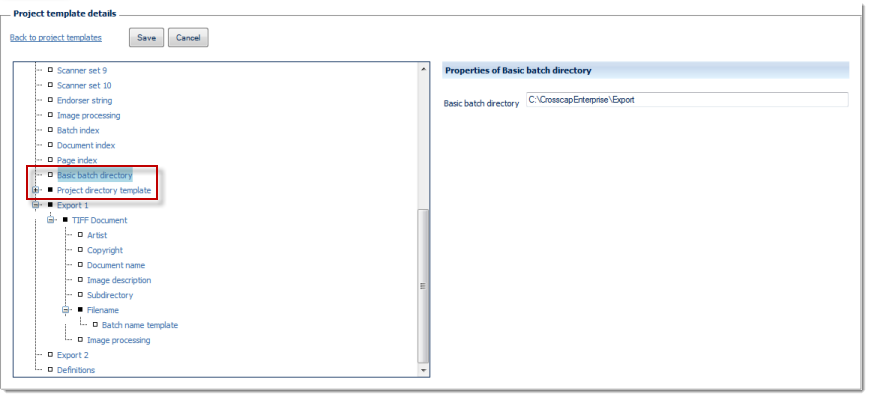
Project directory
Sets the base location used for storage - this setting is static and will not change, during batch processing.
The directory path needs to be entered manually and may be specified using Windows drive letters (e.g. C:\scan) or UNC format (e.g. \\PC01\scan).
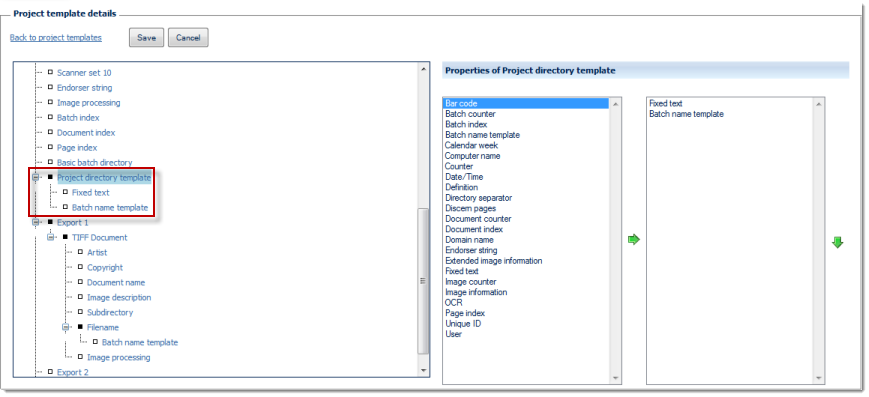
Batch directory template
The left side of the Properties of ... window lists all configuration options available for this item, the right side shows the options chosen so far. By highlighting one of the options and operating the green left or right arrow buttons, the option can be moved back and forth between the left column (available options) and the right column (selected options). If an option is highlighted in the right column (selected options), it may be moved up or down the list by operating the green up or down arrows. This changes the sequence in which the options are executed (processing will proceed from the top of the list).
Any items in the right column (selected options) will also appear in the configuration tree (far left), where they can be highlighted for further configuration.
You may use any of the available variables (such as date/time, calendar week, batch counter and/or fixed text) for generating the Project directory template. For more and detailed information on variables please refer to the separate section on Variables, in the Appendix.
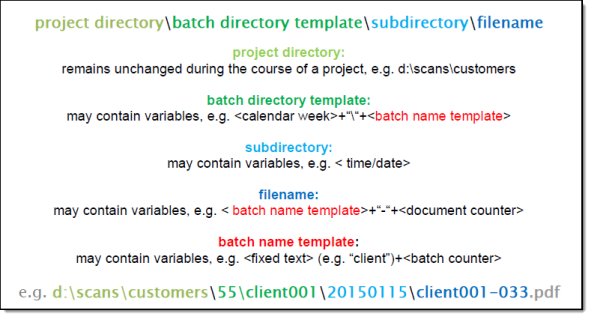
The relationship between directories and batch naming:
Whenever running a new batch, the project directory, the batch directory template, the export subdirectory and the filename will be joined together to dynamically determine the destination paths and filenames of output files, during finalization (the file name extension, however, is invariably determined by the export format chosen). The following graphic illustrates the interdependencies. Please note the dual appearance of the batch name template, in this example.
Items assigned in this section (i.e. Batch directories) are shown in shades of green, items assigned within export definitions are shown in blue.
The batch directory template, as well as the export subdirectory may be left unassigned (empty), however, this is recommended only for special cases (e.g. when feeding a hot-directory for communication with other systems) or for environments with very low output volumes.
Please note: Since the batch name is frequently a component of both, the batch directory template and the name(s) used for output files, they will both (!) change as soon as the template for the batch name is modified (see Batch naming) or overwritten at the start of a project.