Persistently replaces an existing color value (Old color) with a new color value (New color).
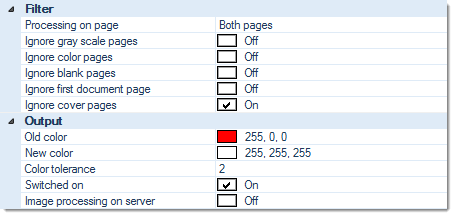
Filter:
Processing on page
Perform this function on ...
- Both sides
- Front pages
- Rear pages
Ignore gray scale pages, Ignore color pages
Specifically applies to multistream mode. If any of these two filters are set to On, then this function is turned off for the respective page type. Please note that combining both options Ignore gray scale pages and Ignore color pages will effectively turn off execution all together, since there are no images left to process.
Ignore blank pages
Turns color replacement off for all blank pages.
Ignore first document page
Causes this function to skip the first page of every document (which usually is the page triggering document separation).
Ignore cover pages
Turns this function off, for cover pages.
Output:
Old color
Specifies the color to be replaced. Either enter the color code manually (RGB hex value) or use the color picker applet, to the right of the input field.
New color
Specifies the color to be inserted. Either enter the color code manually (RGB hex value) or use the color picker applet, to the right of the input field.
Color tolerance
Allows for color tolerances, when specifying the color to be replaced. In the example above (Color tolerance = 2), RGB color values deviating from the Old color value by a count of plus or minus 2 will also be replaced with the New color.
Switched on
Switches this module on or off. Turning this function off will preserve all settings, for later use (as opposed to removing the function). Useful when developing or troubleshooting project templates.
Image processing on server (CROSSCAP Enterprise only)
Image processing requires substantial amounts of CPU capacity. In order to relieve CROSSCAP Scan-Clients from this task and speed up all other processing, image processing functions may be selectively transferred to the CROSSCAP Enterprise server.
If this option is activated (On), then execution of this function will be deferred and processed by the CROSSCAP Enterprise server, later on. Deferred image processing will occur during the pre-process workflow step (see chapter Enterprise Server, section System workflow Enterprise).