This function will detect blank pages (i.e. pages without any discernible content) and either mark them for deletion or delete them immediately.
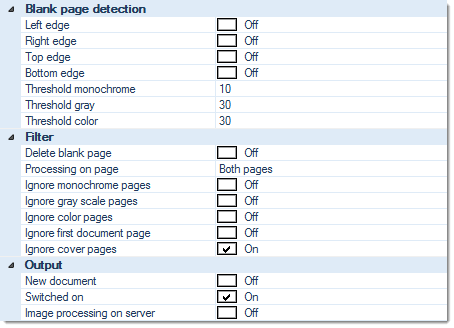
Blank page detection:
Left edge, Right edge, Top edge, Bottom edge
If neither of these options are active, CROSSCAP masks incoming images with an approx. 1.5 cm wide margin, around all four edges of the image. This will minimize incorrect blank page detection due to punch holes, staple marks or shadows/smudges along the edges.
Activating one or several of these options will selectively extend the recognition area, towards that edge of the image. If e.g. text (or other content, like page numbers) will occasionally appear at the bottom edge of an image, you should activate the Bottom edge option.
Threshold monochrome, Threshold gray, Threshold color
Specifies the threshold level for blank page detection, for each of the image categories above. Enter the desired threshold level as a percentage.
Please note: this is a synthetic (not blackness) value based on a distinction between a page's content and its "optical background noise". The underlying algorithm ensures that even tinted or slightly smudged pages are accurately identified as empty pages.
Filter:
Delete blank page
If this option is set to On, any blank pages found will be immediately removed (as opposed to being marked, for later omission).
If this option is set to Off, blank pages will merely be marked for deletion, rather than being removed immediately.
Pages marked for deletion will continue to be displayed in thumbnail and image views (and are marked, e.g. with a red, diagonal cross), but they will not be exported.
Please note: If blank pages are removed using the "Delete blank page" option, they will no longer appear in the application's statistics. If this will cause issues with any billing based on CROSSCAP statistics, please do not use this option (i.e. set it to Off )!
Processing on page
Perform blank page detection on ...
Ignore monochrome pages, Ignore gray scale pages, Ignore color pages
Specifically applies to multistream mode. If any of these three filters are set to On, blank page detection is turned off for the respective page types. Please note that combining all three options Ignore monochrome pages, Ignore gray scaled pages and Ignore color pages will effectively turn off blank page detection, all together, since there are no images left to process.
Ignore first document page
Causes this function to skip the first page of every document (which usually is the page triggering document separation).
Ignore cover pages
Turns this function off, for cover pages.
Output:
New document
If this option is set to On, CROSSCAP will insert a document separator, whenever a blank page is detected.
Switched on
Switches this module on or off. Turning this function off will preserve all settings, for later use (as opposed to removing the function). Useful when developing or troubleshooting project templates.
Image processing on server (CROSSCAP Enterprise only)
Image processing requires substantial amounts of CPU capacity. In order to relieve CROSSCAP Scan-Clients from this task and speed up all other processing, image processing functions may be selectively transferred to a CROSSCAP Enterprise server.
If this option is activated (On), execution of this function will be deferred and processed by a CROSSCAP Enterprise server, later on. Deferred image processing will happen during the pre-process workflow step (see chapter Enterprise Server, section System workflow Enterprise).