Line removal will detect horizontal and/or vertical lines and then remove them. Works with monochrome images only.
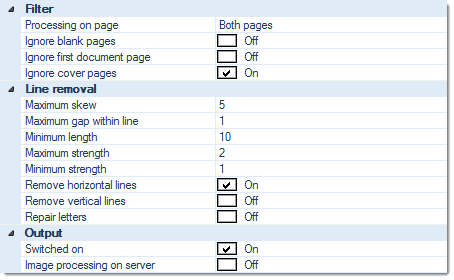
Filter:
Processing on page
Perform this function on ...
- Both sides
- Front pages
- Rear pages
Ignore blank pages
Turns this function off, for all blank pages.
Ignore first document page
Causes this function to skip the first page of every document (which usually is the page triggering document separation).
Ignore cover pages
Turns this function off, for cover pages.
Line removal:
Maximum skew
Specifies the maximum angle of rotation allowed. If skewed beyond this value, lines will not be removed.
Maximum gap within line
Specifies the maximum gap length (in mm) allowed. If they contain longer gaps, lines will not be removed.
Minimum length
Specifies the minimum line length (in mm) allowed. If lines are shorter than this, they will not be removed.
Maximum strength
Specifies the maximum line width (in mm) allowed. If lines are wider than this, they will not be removed.
Minimum strength
Specifies the minimum line width (in mm) allowed. If lines are narrower than this, they will not be removed.
Remove horizontal lines
Restricts Line removal to horizontal lines.
Remove vertical lines
Restricts Line removal to vertical lines.
Repair letters
If this option is set to On, CROSSCAP will attempt to fix letters and numerals which were damaged during line removal. Aimed to improve readability and subsequent text recognition.
Output:
Switched on
Switches this module on or off. Turning this function off will preserve all settings, for later use (as opposed to removing the function). Useful when developing or troubleshooting project templates.
Image processing on server (CROSSCAP Enterprise only)
Image processing requires substantial amounts of CPU capacity. In order to relieve CROSSCAP Scan-Clients from this task and speed up all other processing, image processing functions may be selectively transferred to the CROSSCAP Enterprise server.
If this option is activated (On), then execution of this function will be deferred and processed by the CROSSCAP Enterprise server, later on. Deferred image processing will occur during the pre-process workflow step (see chapter Enterprise Server, section System workflow Enterprise).
(* This image processing function is also available during export. Use if one or more export formats need to be modified selectively.)