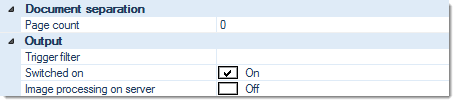
Page countSpecify the number of pages before inserting the next document separator.
Trigger filterThe filter expression entered here will be applied to all bar codes recognized. As soon as the filter expression matches a bar code, document separation will be toggled on or off, depending on its current state.Please note: the triggering bar code will not insert a document separator, it merely turns this function on or off! The insertion of document separators is invariably controlled by the page count setting, above ...All incoming bar codes are examined. The first bar code to match the filter criteria specified here will toggle document separation. Bar codes not matching these filter conditions will be ignored and skipped.The default entry is an asterisk:
*
and will accept any bar code value.
If the Bar code filter begins with a caret (roof) character, however:
^
then the entire filter string will be interpreted as a regular expression, which allows for flexible filtering.
For more and detailed information please refer to the section on Regular expressions, in the Appendix.
Switched onSwitches this module on or off. Turning this function off will preserve all settings, for later use (as opposed to removing the function). Also determines the initial state if the barcode toggle feature is used (see Trigger filter above).
Image processing on server (CROSSCAP Enterprise only)
Image processing requires substantial amounts of CPU capacity. In order to relieve CROSSCAP Scan-Clients from this task and speed up all other processing, image processing functions may be selectively transferred to the CROSSCAP Enterprise server.
If this option is activated (On), then execution of this function will be deferred and processed by the CROSSCAP Enterprise server, later on. Deferred image processing will occur during the pre-process workflow step (see chapter Enterprise Server, section System workflow Enterprise).